 Modern work can sometimes feel like an endless cycle of meetings, emails, messages, deadlines, and competing priorities.
For busy professionals, the challenge is not always a lack of productivity tools. Sometimes, the bigger problem is knowing what deserves attention first.
Artificial intelligence is increasingly being explored as a practical assistant for organizing information, prioritizing tasks, preparing meetings, managing communication, and creating more structured workflows.
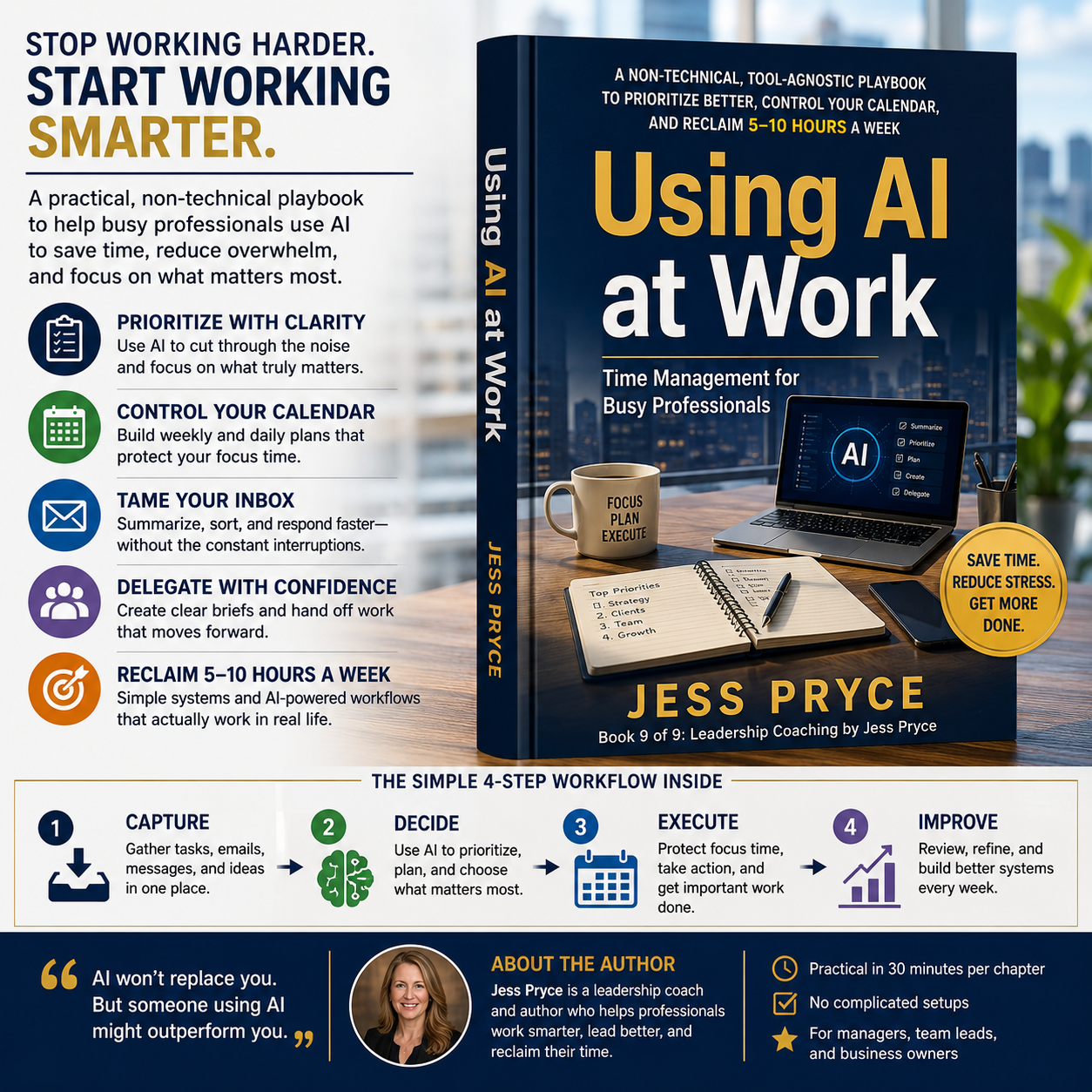
That is the focus of Using AI at Work: Time Management for Busy Professionals: A Non-Technical, Tool-Agnostic Playbook to Prioritize Better, Control Your Calendar, and Reclaim 5–10 Hours a Week by Jess Pryce.
The book is designed for managers, team leaders, and business owners who want to explore practical ways of incorporating AI into their work without needing advanced technical knowledge.
What Is Using AI at Work About?
Using AI at Work focuses on the intersection of artificial intelligence, time management, productivity, and professional workflows.
Rather than teaching readers how to build AI systems, the book looks at how existing AI tools can potentially assist with common workplace challenges.
The book covers areas such as:
- Task prioritization
- Weekly planning
- Daily planning
- Calendar management
- Focus time
- Meeting management
- Email and inbox organization
- Delegation
- AI-supported workflows
- Professional judgment
- Privacy-conscious AI use
The book is described as non-technical and tool-agnostic, meaning the concepts are intended to be applicable across different AI tools rather than being tied exclusively to one particular platform.
Why Time Management Is Still Difficult
Having a digital calendar and task-management application does not automatically make someone more organized.
Professionals can still end up with:
- Too many meetings
- Constant notifications
- Long email threads
- Unclear priorities
- Interruptions
- Overloaded task lists
- Last-minute requests
- Difficulty protecting focused work time
The problem is often not the absence of information.
It is the difficulty of deciding what to do, when to do it, and what can wait.
This is where AI may potentially become useful as a support tool.
How AI Can Assist With Task Prioritization
One of the book’s main topics is using AI to help with task prioritization.
Imagine starting the day with a long list of tasks.
Instead of looking at every task individually, a user could organize the information and ask an AI tool to help categorize items based on factors such as:
- Urgency
- Importance
- Deadline
- Business impact
- Dependencies
- Estimated effort
The AI’s output can then serve as a starting point for human decision-making.
It should not automatically decide what matters most.
The final decision still belongs to the person responsible for the work.
The Capture → Decide → Execute System
The book is structured around a simple operating concept:
Capture → Decide → Execute
This framework can be useful because productivity problems often begin when tasks are scattered across multiple places.
A professional might have information in:
- Messaging applications
- Meeting notes
- Calendar entries
- Documents
- Personal notes
- Task lists
Capture
Collect relevant information in a manageable system.
Decide
Determine what actually needs attention and establish priorities.
Execute
Carry out the work according to those priorities.
AI can potentially assist with parts of each stage, particularly when dealing with large amounts of text or information.
Using AI for Weekly Planning
Weekly planning can help professionals move beyond reacting to whatever arrives in their inbox.
An AI assistant can potentially help organize a list of responsibilities into a weekly structure.
For example, a user might provide:
- Important projects
- Upcoming deadlines
- Meetings
- Recurring responsibilities
- Personal availability
- High-priority tasks
The AI can then help generate a preliminary schedule or identify potential conflicts.
The professional should review that plan and make the final decisions.
Managing the Calendar More Effectively
Calendar overload is a common workplace problem.
A calendar can become filled with meetings while leaving little uninterrupted time for actual work.
The book discusses ways to think more deliberately about calendar management, including protecting focus time and reducing unnecessary scheduling.
AI may help identify patterns such as:
- Too many meetings in one day
- Repeated meetings with unclear objectives
- Conflicting commitments
- Insufficient preparation time
- Lack of uninterrupted work periods
The technology can assist with analysis, but organizational policies and human relationships still need to be considered.
Reducing Meeting Overload
Meetings can be useful when they have a clear purpose.
They can become less useful when participants gather without a specific decision, outcome, or agenda.
Using AI at Work discusses decision-driven agendas and asynchronous alternatives as part of its approach to reducing meeting overload.
AI can potentially help prepare meeting agendas by organizing:
- Topics
- Decisions required
- Background information
- Questions
- Action items
- Participants
In some situations, an asynchronous update may also be more appropriate than another meeting.
AI and Email Management
Email can consume significant amounts of time, especially for managers and team leaders.
AI may assist with email-related tasks such as:
- Summarizing long threads
- Identifying action items
- Drafting responses
- Categorizing messages
- Extracting deadlines
- Creating follow-up lists
However, AI-generated responses should always be reviewed before sending.
A professional email often requires context, judgment, and knowledge of the relationship between the people involved.
Delegation With AI Support
Delegation is another area covered by the book.
Good delegation requires more than simply telling someone to complete a task.
The person receiving the assignment needs to understand:
- What needs to be done
- Why it matters
- What the expected result looks like
- When it is due
- What resources are available
- How progress will be evaluated
AI can potentially help turn a vague task into a clearer brief.
For example, a manager could use AI to organize a project request into objectives, deliverables, deadlines, and questions that need clarification.
The manager still needs to review and approve the final instructions.
AI and Focus Time
Constant interruptions can make concentrated work difficult.
Notifications, meetings, messages, and email can fragment a professional’s schedule.
One of the book’s themes is protecting focus time instead of allowing the entire workday to become reactive.
AI can potentially help identify recurring interruptions and assist in planning protected periods for important work.
But productivity ultimately depends on workplace culture as well.
A perfectly organized calendar will not solve a situation where employees are expected to respond immediately to every message.
Responsible AI Use at Work
Using AI in a professional environment also creates responsibilities.
Employees may be tempted to copy workplace information directly into an AI system without considering privacy or confidentiality.
That can create unnecessary risks.
Before using AI with professional information, users should consider:
- Is the information confidential?
- Does it contain personal data?
- Does company policy allow this use?
- Is the AI service approved by the organization?
- Does the information need to be anonymized?
- Is human review required?
The book specifically emphasizes privacy-conscious rules and professional judgment when using AI at work.
AI Does Not Replace Professional Judgment
One of the most important principles when using AI at work is that the technology should support decision-making rather than automatically replace it.
AI can summarize information.
It can organize a list.
It can suggest priorities.
It can draft an email.
It can propose a schedule.
But a human still needs to determine whether the recommendation makes sense.
This is particularly important for managers and business owners making decisions that affect employees, customers, budgets, and business operations.
Is This a Technical AI Book?
No.
Using AI at Work is specifically positioned as a non-technical guide.
Readers do not need to understand machine-learning algorithms, programming languages, or how large language models are trained.
The emphasis is on practical workplace applications.
This makes the book more suitable for professionals who are interested in using AI rather than developing AI technology.
Who Is Using AI at Work For?
The book may be useful for:
- Managers
- Team leaders
- Business owners
- Entrepreneurs
- Office professionals
- Project managers
- Consultants
- Freelancers
- Professionals dealing with heavy workloads
- People interested in AI productivity
It may be particularly relevant to someone who already uses digital productivity tools but wants to explore how AI could become part of their workflow.
What Can You Potentially Learn From the Book?
The book’s practical focus can help readers think about AI in terms of specific workplace problems rather than generic technology trends.
For example:
Problem: Too many tasks.
Potential AI role: Help organize and categorize the task list.
Problem: Long email threads.
Potential AI role: Summarize key points and action items.
Problem: Meeting overload.
Potential AI role: Help structure agendas and identify whether a meeting has a clear purpose.
Problem: Unclear delegation.
Potential AI role: Help turn a rough request into a structured project brief.
Problem: Disorganized weekly planning.
Potential AI role: Help create a preliminary plan based on deadlines and priorities.
These are examples of AI-assisted workflows, not guarantees of improved productivity.
About the 5–10 Hours a Week Claim
The title mentions the possibility of reclaiming 5–10 hours a week.
This should be understood as a stated benefit or target presented in the book’s marketing description, not as a guaranteed result for every reader. The amount of time someone might save depends heavily on their job, existing workflow, AI tools, organizational policies, and how consistently the methods are applied.
This distinction is important when evaluating productivity books.
A workflow that saves considerable time for one professional may have little effect on another person’s work.
About the Author
Jess Pryce is the author of Using AI at Work and the Leadership Coaching by Jess Pryce series.
The book is listed as the ninth book in that series on the Amazon information shown in the provided screenshot.
The Kindle edition is listed as a 2026 publication, with Goodreads recording a publication date of January 20, 2026 and 223 pages.
Book Details
Title: Using AI at Work: Time Management for Busy Professionals: A Non-Technical, Tool-Agnostic Playbook to Prioritize Better, Control Your Calendar, and Reclaim 5–10 Hours a Week
Author: Jess Pryce
Series: Leadership Coaching by Jess Pryce
Book: 9 of 9
Publication: January 20, 2026
Length: 223 pages
Format: Kindle Edition, with paperback and other formats also listed
Language: English
Category: Business & Productivity / Time Management / Workplace AI
Main Topics: AI at Work, Time Management, Productivity, Task Prioritization, Calendar Management, Meeting Management, Email Management, Delegation, AI Workflows
Bibliographic information for the Kindle edition is corroborated by Goodreads, while the publisher description is also reproduced by audiobook retailers.
Where to Buy Using AI at Work
If you are interested in learning more about practical ways AI can be incorporated into workplace planning and productivity, you can check the current Amazon listing here:
👉 Check Using AI at Work by Jess Pryce on Amazon
Affiliate disclosure: This article contains an affiliate link. If you make a purchase through the link, the publisher of this website may receive a commission at no additional cost to you.
Final Thoughts
Artificial intelligence does not automatically make a person more productive.
The real value comes from understanding where AI can assist and where human judgment remains essential.
Using AI at Work by Jess Pryce takes a practical approach to this idea by focusing on everyday workplace challenges such as task prioritization, calendar management, meetings, inboxes, delegation, and protecting focused work time.
Its non-technical approach may make it accessible to professionals who are interested in AI but do not have a technical background.
The book is best viewed as a workplace productivity and AI workflow guide, rather than a technical manual about artificial intelligence.
For readers searching for an AI productivity book, AI at work guide, time management book for professionals, workplace AI guide, AI productivity for managers, AI tools for business professionals, calendar management book, meeting productivity guide, or AI workflow book, Using AI at Work is a title worth exploring.